
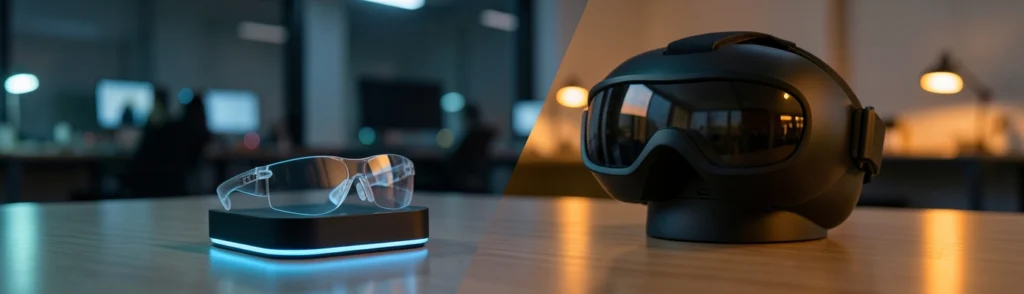

Intro: Android XR Glasses vs VR Headsets at a Glance
The comparison between Android XR glasses vs VR headsets is no longer limited to gaming. Both form factors are becoming practical tools for remote work, digital design, training, research, presentations, and AI-assisted computing.
Android XR glasses aim to place virtual screens and contextual information in front of you while keeping you connected to the physical world. VR headsets take the opposite approach: they surround you with a controlled digital environment, often providing stronger immersion and more reliable focus.
For everyday productivity, neither category wins in every situation. Glasses generally offer better portability, environmental awareness, and comfort during mixed physical-digital tasks. Headsets usually deliver better immersion, multitasking control, and distraction-free workspace management.
The right choice depends less on display specifications and more on how you work. Someone moving between meetings and a laptop may prefer glasses, while a designer building a 3D model or a trainee practicing a complex procedure may benefit from a headset.
The Short Answer for Everyday Work
For most office and hybrid-work users, Android XR glasses are the more practical everyday option. They are easier to carry, quicker to put on, and more suitable for environments where you still need to see coworkers, documents, keyboards, and your surroundings.
A pair of mixed reality glasses for productivity can act like a portable multi-monitor system. Connect them to a compatible computer, handheld device, or smartphone, and you may gain a large virtual display without carrying a physical monitor.
VR headsets remain the better choice when deep focus matters more than convenience. Their enclosed design reduces visual distractions and makes it easier to create a private virtual office. However, the extra weight, heat, setup time, and isolation can make them less comfortable for several hours of routine work.
Who Should Choose Glasses, Headsets, or Both?
Choose Android XR glasses if you:
- Work in multiple locations
- Travel frequently
- Need to remain aware of people around you
- Want portable virtual screens
- Use USB-C devices such as laptops, tablets, or handheld consoles
- Prefer short setup times
Choose a VR headset if you:
- Need an enclosed, distraction-free workspace
- Work with 3D models or immersive simulations
- Perform virtual training
- Want precise spatial interaction
- Can dedicate a desk or room to XR work
A business may also choose both. Glasses can serve as mobile productivity devices, while headsets support specialized design, training, or collaboration teams.
Background: What Are Android XR Glasses vs VR Headsets?
Android XR glasses are wearable displays built around Google’s Android XR platform. They combine transparent or partially transparent optics with cameras, sensors, speakers, and software that can display conventional 2D applications alongside spatial 3D content.
VR headsets use enclosed displays positioned close to the eyes. They usually track the user’s head and hands, creating a digitally controlled environment. Some modern headsets also offer passthrough video, allowing the real world to appear through external cameras rather than transparent lenses.
The distinction is similar to the difference between a car windshield and a cinema screen. Glasses add digital information to the view you already have. A headset can replace that view entirely.
What Is Android XR?
Android XR is Google’s platform for extended-reality devices, including glasses and headsets. It is intended to support familiar Android applications as well as software designed specifically for spatial computing.
That combination matters for work. Users do not necessarily need to abandon the apps they already understand. Email, browsers, calendars, office tools, video calls, and messaging applications can continue to operate as 2D windows, while XR-native software adds 3D workspaces and interactive environments.
Android XR also creates an opportunity for Gemini-assisted experiences. An assistant could help interpret information shown on screen, answer questions, summarize documents, or provide step-by-step guidance without requiring the user to reach for a phone.
How Android XR Apps Support 2D and 3D Workflows
The strongest productivity case for Android XR apps is their ability to combine two-dimensional and three-dimensional workflows.
A project manager might keep a browser, spreadsheet, and chat application arranged as virtual monitors while viewing a 3D product prototype beside them. An engineer could inspect a model in space, then open a conventional documentation window without switching devices.
This is more flexible than a traditional monitor setup, but it is not automatically better. Virtual screens still depend on readable text, accurate tracking, reliable input, and an operating system that makes window management simple.
The experience should be treated as an expandable desk rather than a replacement for every physical tool. A keyboard and trackpad may remain faster for writing, coding, and spreadsheet work.
How Glasses and Enclosed VR Headsets Differ
The most important difference is how each device manages the boundary between the user and the environment.
Glasses preserve a direct connection to the room. A headset creates a digital space around the user. This affects comfort, privacy, concentration, collaboration, and safety.
Glasses are closer to wearing a laptop screen on your face. A headset is closer to entering a private office that happens to move with you.
Transparent Displays, Virtual Screens, and Environmental Awareness
Transparent displays allow users to see digital content while remaining aware of physical objects and people. This is useful in offices, airplanes, workshops, and shared homes.
Environmental awareness can also support more natural collaboration. You can glance at a coworker, pick up a physical notebook, or walk through a room without removing the device.
The trade-off is that transparent displays may provide less visual isolation. Bright rooms, reflections, and background movement can compete with virtual content. Enclosed headsets usually offer stronger contrast and more consistent immersion.
Tethered Processing and Standalone Computing
Many glasses reduce weight by shifting processing, storage, and battery capacity into a separate wired device. In the Xreal Aura approach, a pocket-sized computing puck handles much of the work while the glasses remain relatively lightweight.
This split architecture is practical but introduces a cable and another device to manage. Standalone VR headsets place the major components on the wearer’s head, which simplifies setup but adds weight.
The choice resembles carrying a compact laptop in a shoulder bag versus wearing a heavier all-in-one computer as a helmet. One option moves the burden away from your face; the other reduces the number of separate parts.
Trend: Why Mixed Reality Glasses for Productivity Are Growing
Interest in mixed reality glasses for productivity is increasing because workers want larger digital workspaces without larger physical desks.
Remote employees may use glasses in hotels, shared apartments, or temporary offices. Field workers can view instructions while keeping both hands available. Executives can review dashboards during travel without opening a full laptop.
AI is another factor. Voice assistants, visual search, translation, and contextual guidance become more useful when they are available in the user’s field of view rather than hidden inside a phone.
5 Benefits of Mixed Reality Glasses for Productivity
Glasses are generally easier to wear for short and medium-length work sessions than enclosed headsets. Weight distribution, nose pressure, heat, and facial fit still matter, but the open design can feel less isolating.
A lighter device is especially useful for meetings, travel, and brief research sessions where putting on a large headset would be inconvenient.
Virtual displays can turn a small table into a flexible workstation. A user might position a browser on the left, a document in the center, and a messaging app on the right.
This is one of the clearest advantages over a laptop alone. Instead of carrying two physical monitors, the user carries glasses and a compatible computing device.
Voice and hand input can make Android XR apps accessible without constant keyboard interaction. A user could ask Gemini to summarize a document, identify an object, or explain a visual element.
Hands-free controls are valuable in training, logistics, healthcare, and repair work. However, voice input is not always appropriate in public spaces, and hand tracking can be less precise than a mouse or keyboard.
Open glasses are better suited to shared environments. Users can remain visually connected to coworkers, monitor surroundings, and avoid the social barrier created by an enclosed headset.
This does not eliminate privacy concerns. Cameras and microphones can still create discomfort, especially in offices where people may not know when they are being recorded or analyzed.
USB-C connectivity makes glasses useful as external displays for laptops, gaming handhelds, tablets, and compatible phones. This can extend the life of existing hardware rather than requiring a fully separate XR computer.
For travelers, the combination can be attractive: one handheld device, one cable, and a large virtual screen.
Xreal Aura Review: The Android XR Glasses Approach
An Xreal Aura review should focus on the design philosophy as much as the specifications. The device represents a glasses-first approach to XR, using transparent optics, external processing, and Android XR software rather than placing every component inside a heavy headset.
The result is designed to sit between ordinary smart glasses and an enclosed VR system. It can support conventional apps, XR-native experiences, virtual monitors, and external USB-C sources.
The Aura’s reported display features include Sony Micro-OLED panels, high resolution, and a refresh rate suitable for smooth navigation and video. A wide field of view can make virtual monitors feel more expansive than those on conventional smart glasses.
Bose-supported audio is intended to keep sound near the wearer without requiring separate headphones. The glasses also support several input methods, including voice, hand gestures, keyboards, trackpads, and controllers.
Comfort remains the critical question. Even a sub-100-gram device can become tiring if its weight presses unevenly on the nose or temples. Prescription support, fit adjustment, brightness, and text sharpness may matter more to office users than headline display numbers.
Moving the battery and primary processing into a pocket puck helps reduce the glasses’ weight. This is one of the most important wired XR headset benefits: the user’s face carries less hardware.
The disadvantage is dependence on a cable and a separate controller. The puck must be charged, carried, and kept connected. A cable can catch on a chair, restrict movement, or make the setup feel less natural.
The Aura approach is therefore not truly frictionless. It trades facial weight for pocket weight and cable management.
Insight: Android XR Glasses vs VR Headsets for Real Work
The practical comparison should focus on the complete workflow rather than isolated hardware specifications.
A device that looks impressive in a product demonstration may still be frustrating if it cannot handle your keyboard, collaboration software, display preferences, or privacy requirements.
Android XR Glasses vs VR Headsets Comparison
| Category | Android XR glasses | VR headsets |
|---|---|---|
| Portability | High | Moderate to low |
| Immersion | Moderate | High |
| Awareness | Strong | Limited |
| Setup | Quick | More involved |
| Focus | Moderate | Strong |
| Best use | Mobile work | Deep or specialized work |
The main takeaway is straightforward: glasses optimize for flexibility, while headsets optimize for control. Neither is a universal monitor replacement.
Glasses are effective when you need a few portable screens and frequent access to the real world. Headsets can offer more consistent spatial layouts and larger virtual workspaces.
For writing, coding, and spreadsheets, physical keyboards remain important. A headset may provide more stable window placement, but glasses may be more comfortable during shorter sessions.
VR headsets win for focus because they can block visual distractions. This is useful for deep reading, design, simulation, and concentrated analysis.
Glasses are better when interruptions are expected. They allow the user to see a coworker or respond to the physical environment without removing the device.
Glasses typically win portability. A pocket puck and USB-C cable can still be inconvenient, but the overall package is smaller than most standalone headsets.
Headsets can be comfortable with careful adjustment, but heat, facial pressure, and battery limitations become more noticeable during long sessions.
Open glasses support more natural collaboration, but their cameras and microphones may raise workplace privacy concerns. Enclosed headsets make the user’s activity less visible and can create a social barrier.
Companies will need clear policies covering recording indicators, data storage, AI processing, and bystander consent before XR becomes common in shared offices.
Premium glasses and headsets can both approach laptop-level pricing. The total cost includes prescription inserts, controllers, protective cases, replacement cables, and compatible computers.
Glasses may offer better battery endurance when connected to an external device, but the puck becomes another battery to maintain. Headsets are simpler as standalone products but may need frequent charging during demanding sessions.
Wired XR Headset Benefits and Limitations
A wired design can move batteries and heat away from the face. It may also provide more reliable performance than wireless streaming, particularly for high-resolution virtual screens and demanding XR apps.
For professionals who work at a desk, the cable may be an acceptable trade-off. It can also reduce latency and avoid dependence on a strong wireless network.
The same cable becomes a problem when users move frequently. Travel, presentations, warehouse work, and standing meetings all make cable management more noticeable.
A pocket puck also complicates the ownership experience. Losing, forgetting, or failing to charge one part makes the glasses unusable.
Which Form Factor Wins by Work Scenario?
Android XR glasses are the better fit for hybrid workers who move between rooms, offices, and homes. They provide virtual monitors without requiring a permanent desk setup.
A VR headset may be preferable for a private home office where isolation and focus are more important than mobility.
VR headsets win for 3D design, immersive training, virtual laboratories, and simulation. Their enclosed field of view provides better control and makes spatial content easier to inspect.
Glasses can still support lightweight visualization, but they are less effective when the task requires complete immersion.
Glasses are the clear choice for travel and presentations. They are smaller, faster to deploy, and less socially disruptive.
They can also provide a large private display on an airplane or in a hotel room. However, users should test brightness, text readability, and device compatibility before relying on them for important work.
Forecast: The Future of Android XR Apps for Work
Android XR apps are likely to expand from entertainment and demonstrations into practical workplace tools. The platform’s advantage is its connection to the existing Android ecosystem, which gives developers a familiar foundation for building 2D and spatial experiences.
The next stage will depend on whether developers create software that improves workflows rather than simply placing flat apps inside virtual rooms.
How Android XR Could Expand Workplace Software
Future applications may allow teams to inspect the same 3D object, annotate it, and discuss changes from different locations. Training software could place workers inside realistic simulations while instructors monitor progress.
This may be especially valuable in manufacturing, healthcare, engineering, construction, and technical support.
AI assistants could make XR more useful by understanding what the user sees and what task they are attempting. Gemini might summarize a displayed document, identify a component, or guide a worker through a procedure.
The best implementations will be selective rather than constantly interruptive. An assistant that speaks every few seconds would become distracting, while one that responds accurately when requested could save significant time.
What Must Improve Before XR Replaces Monitors?
XR devices need lighter designs, better fit systems, longer battery life, and more dependable input. Hand tracking is promising, but keyboards, trackpads, and controllers remain essential for precise work.
Text rendering must also improve. If users cannot read small text comfortably, they will return to physical monitors for serious office tasks.
Enterprise adoption requires reliable Android XR apps, identity management, device controls, security updates, and clear data policies.
Businesses will also demand local processing where possible, encryption, visible recording indicators, and controls that protect bystanders. Privacy cannot be treated as a minor product feature when glasses contain cameras and AI capabilities.
The long-term winner may not be one form factor. Android XR glasses are likely to become the default for lightweight, contextual computing, while VR headsets will remain valuable for immersive work.
Over time, glasses may gain better displays, longer battery life, and stronger AI assistance. Headsets may become lighter and more comfortable, narrowing the gap for everyday use.
The likely outcome is a two-device workplace ecosystem rather than a single replacement for the laptop and monitor.
Call to Action: Choose Your Work XR Form Factor
Before buying, ask:
- Do you need to see coworkers and your surroundings?
- Will you use the device for hours or in short sessions?
- Are your essential apps available on Android XR?
- Do you need a keyboard, trackpad, controller, or hand tracking?
- Can your laptop or phone output video over USB-C?
- Is a cable acceptable for your work environment?
- Does your organization have privacy rules for cameras and AI?
Choose glasses if you want a compact virtual display, move frequently, or work in shared spaces. They are also the better option for travel and quick access to AI-assisted information.
Choose a VR headset if your work benefits from visual isolation, 3D accuracy, training simulations, or a fully controlled environment.
Do not judge an XR device only through specifications. Test your browser, office suite, video conferencing software, keyboard, mouse, laptop, and phone.
A device that supports your actual daily workflow is more valuable than one with the widest theoretical field of view.
Conclusion: Android XR Glasses vs VR Headsets for Productivity
The debate over Android XR glasses vs VR headsets has no universal winner. Glasses are more portable, socially flexible, and suitable for mixed physical-digital work. Headsets offer stronger immersion, focus, and spatial control.
For most everyday productivity, Android XR glasses are likely to be the easier starting point. They extend existing devices and provide virtual screens without fully disconnecting users from their surroundings.
Start with the task you perform most often. If that task involves travel, multitasking, quick information access, or shared spaces, glasses are the logical choice. If it involves design, simulation, deep focus, or immersive training, a headset may deliver more value.
XR productivity will succeed when it removes friction rather than adding novelty. The best device is the one that helps you work faster, stay comfortable, and remain in control of both your digital tools and the physical world.